
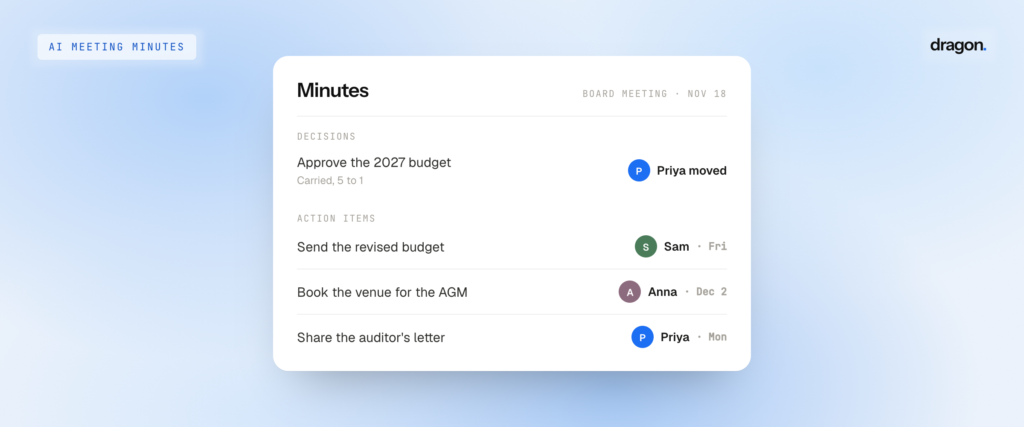
AI meeting minutes are a written record of a meeting’s decisions, motions and action items, drafted by an AI tool from a recording. They save a lot of typing. However, they are only as useful as the names attached to each decision, which is where most AI minutes need a second look.
Every meeting ends with a mix of decisions, promises and things to do. Anyone who has taken minutes by hand knows that typing these out is the easy part. The real task is keeping track of what the group decided and who owns what happens next, so that everyone walks away with the same picture of who agreed to do what. This is exactly where an AI summary can stumble, as it may read beautifully and still put a task next to the wrong name.
What meeting minutes actually need
Good minutes of the meeting are short and to the point. They cover the date, who attended, the agenda, each decision and the action items, with an owner and a due date next to every task. This sounds simple enough on paper. However, it is where most meetings come undone. In a survey of 5,000 knowledge workers, Atlassian found that 54% often leave meetings without a clear idea of next steps or who owns which tasks. Board meeting minutes carry even more weight, since they become the official record of what a board approved.
Names matter most of all, which is why the biggest meeting platforms have built their AI around them. Zoom says AI Companion organizes its summary by who said what before it lists the next steps. Google Meet’s “take notes for me” feature also has a next steps section, which Google says lists the actionable items and assigned tasks. In a board meeting, the name that counts is the person who made the motion, while in a team meeting it is the owner of each action item. A line like “Send the revised budget by Friday” is of little to no use without the name of the person who said they would do it.
How AI meeting minutes are made
Most AI meeting minutes generators and meeting minutes apps follow the same four steps, even if they describe them a little differently. First, the tool records the meeting, either by joining a video call or through a phone or laptop microphone in the room. Then, it turns the speech into text and splits the recording into separate voices, a process known as “diarization.” The third step is putting a name on each voice. Once this is done, a language model reads the named transcript and drafts the minutes, including decisions, motions, action items and owners. We explain why in more detail in our guide to how AI notetakers tell speakers apart.
This third step decides whether the minutes can be trusted at all. A summary tool can only hand an action item to whoever the transcript says was speaking. Therefore, if the transcript gets the speaker wrong, the minutes will give the task to the wrong person (and with complete confidence).
Where AI minutes get the names wrong
Most tools take names from the meeting platform or the calendar invite. This works well when everyone is on a video call from their own laptop, but it slips the moment the meeting stops matching the invite. An attendee list only shows who was asked to come, and says nothing about who moved to approve the budget.
Rooms are the other weak spot, and plenty of board meeting minutes are recorded in one. Microsoft acknowledges this in its own Teams documentation. Without speaker recognition, audio is attributed to the room in AI notes, and people appear as “Speaker 1” or “Speaker 2” next to the room name.
Then come the messy moments. A motion made over the end of someone else’s sentence, or a quick “I’ll take that” while the room is laughing, is usually where names get swapped. Before approving minutes drafted from a recording, it helps to know why AI notetakers mix people up.
How to take meeting minutes with AI and check them
There’s no need to reread the whole transcript. A few minutes spent on the parts that matter is usually enough.
Start with the motions and decisions, and check that each one sits with the person who made it. Then, read through the meeting action items. Every owner should be someone who actually agreed to the task, so a name that simply came up in conversation does not belong on the list. Next, count the attendance list against the people who were really there, since a missing name can affect a quorum. Lastly, look closely at any decision made during an interruption, since this is where the wrong name tends to land.
For in-person meetings, the setup helps more than any setting. Place the phone in the middle of the table, so each voice is heard clearly by the AI notetaker for consistent capture and speaker recognition.
AI meeting minutes with Dragon Notes
Dragon Notes is built around the step most minute takers rush, which is putting the right name on each voice. Name someone once, and Dragon Notes recognizes their voice in every meeting after that, whether it is a video call or a discussion around a boardroom table.
After each meeting, Dragon Notes brings back the decisions and promises made, along with who made them, so action items arrive with names already attached. If a name ever needs changing, simply click on it and pick the right person – that is the whole fix. Dragon Notes works on iPhone, iPad, Android, Mac, Windows and Apple Watch. It can also turn old voice memos into named notes, which comes in handy when a past meeting needs minutes after the fact.
Frequently asked questions
Can AI take meeting minutes?
Yes. AI tools can record and transcribe a meeting, and then draft minutes with decisions and action items. However, the draft still needs a quick human check, especially of who made each decision.
Are AI meeting minutes accurate?
The words usually are. The names are where AI minutes most often slip, especially in shared rooms or when someone joins without an invite.
Should minutes include who said what?
Not everything. Minutes mainly record what the group did. However, the person who made each motion and the owner of each action item should always be named.
Can AI take board meeting minutes?
Yes, as a first draft. Since most boards approve minutes at the next meeting anyway, a member should review the AI draft before it is shared.
Try it at your next meeting
AI can take care of the typing, while the names are what turn notes into a record. Dragon Notes recognizes voices, so every decision and action item lands with the right person attached. It is free for the first week, then $1.99 a month. So, record your next meeting, and see who it remembers!