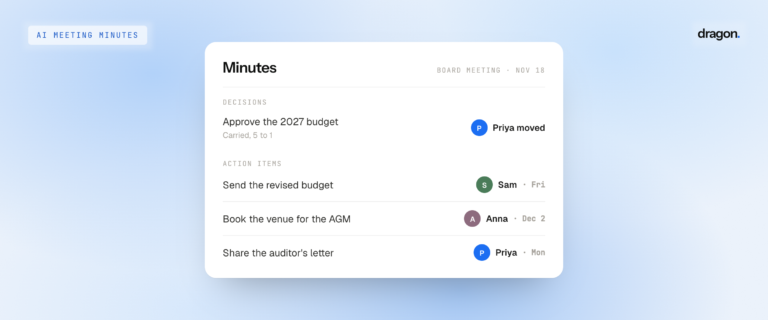

Tap your watch to record a conversation, even with your iPhone in another room. Afterward, Dragon Notes on your iPhone gives you a summary, a list of action items, and a transcript that shows who said what. It also remembers voices from one conversation to the next.
Why record from your wrist
A lot of important conversations happen away from a desk: a walk with a client, a coffee chat, a doctor’s appointment, a quick catch-up in the hallway. When you pull out your phone and set it on the table, the mood shifts and people get guarded. Tapping your watch is quick and quiet, so you can stay focused on the person you’re talking to.
What you need
- Dragon Notes Pro: $1.99 a month or $19.99 a year. New to Dragon Notes? Your first week of Pro is free.
- An iPhone with Dragon Notes version 1.3.17 or later
- An Apple Watch (Series 4 or later, any SE, or any Ultra) running watchOS 10 or later
Set up Dragon Notes on your Apple Watch
You only need to pair your watch once. It takes about a minute.
- Open Dragon Notes on your Apple Watch. It will show a short code.
- On your iPhone, open Dragon Notes and go to Settings → Devices → Add a device.
- Enter the code.
Your watch is now connected to your Dragon Notes account. The code makes sure your recordings go to your account and nobody else’s.
How to record a conversation
- Open Dragon Notes on your watch and tap Record.
- A timer and moving sound bars show that it’s listening.
- Need a break? Tap Pause, then Resume when you’re ready.
- When you’re finished, tap End to save the recording, or Discard to delete it.
The watch records on its own, so your iPhone doesn’t need to be nearby. A single recording can run up to 4 hours.
Tip for better audio: The watch has a small microphone. Rest your wrist on the table and keep it closer to the person speaking than to background noise like an espresso machine or traffic.
Start recording from your watch face
Add the Dragon Notes Record button to your watch face. One tap opens the app and starts recording, so you never have to look for it.
Record a meeting from your calendar
Swipe to see today’s upcoming meetings. If a meeting has already started or begins within 5 minutes, tap it to start recording. The note is saved under that meeting’s name, so it’s easy to find later.
What happens after you tap End
Your watch sends the recording using whatever connection it has: your iPhone if it’s nearby, Wi-Fi, or cellular on watches that support it. If none of those is available, the watch keeps the recording safe and sends it as soon as it can connect. The watch’s recordings list shows each recording’s time and length. It says “Sending…” while the recording is on its way and “Sent” once it arrives.
Open Dragon Notes on your iPhone and you’ll find:
- A short summary of what was discussed
- Action items, so everyone knows who’s doing what
- A full transcript with each person’s name next to what they said
Speaker names that carry over
Many Apple Watch recording apps label speakers as “Speaker 1” and “Speaker 2,” or don’t label them at all. Dragon Notes learns the actual people. Tell it who’s speaking once, and it will recognize that voice in later conversations. Whether you meet in a conference room, on a video call, or on a walk, your manager is labeled “Priya,” not “Speaker 2.”
Ask about past conversations
Dragon Notes connects each conversation to the ones that came before. You can ask questions like “Did we already talk about the budget?” or “What did Sam promise last week?” The answer links to the exact point in the transcript where it was said.
Your notes stay private
Your recordings, transcripts, and notes are end-to-end encrypted, so only you can read them.
How this AI note taker for Apple Watch compares
| Dragon Notes | Siri Recap | Apple Voice Memos | |
|---|---|---|---|
| Records on Apple Watch | Yes | Yes (Series 12 and Ultra 4) | Yes |
| Full transcript | Yes | No, high-level summary only | Yes, on iPhone |
| Speaker names | Yes, remembered across conversations | Not listed by Apple | Not listed by Apple |
| Action items | Yes | Not listed by Apple | No |
| Price | $1.99/month or $19.99/year, first week free | Built in | Free |
Siri Recap is useful for getting the general idea of what was said, but Apple describes it as “a brief, high-level summary, not a detailed record or transcript.” Use Dragon Notes when you need a full record of who said what.
A note on consent
Let people know you’re recording before you start. It’s polite, and in many places the law requires it.
Frequently asked questions
Can Apple Watch record a conversation without my iPhone nearby?
Yes. Dragon Notes records directly on your watch. When you’re done, the watch sends the recording through your iPhone, Wi-Fi, or cellular, whichever is available, and Dragon Notes turns it into notes.
Does Dragon Notes transcribe on the watch?
No. Your watch handles recording only. The transcript, summary, and action items are created after the recording is sent, and they appear in Dragon Notes on your iPhone.
Does Dragon Notes know who’s speaking?
Yes. Once Dragon Notes knows a person’s voice, it labels them by name in future transcripts, including recordings from your watch.
How long can I record on my Apple Watch?
Each recording can be up to 4 hours long, enough for a long meeting or a full workshop.
Do I need Dragon Notes Pro?
Yes, Apple Watch recording is a Pro feature. New users get a free week of Pro when they sign up, so you can try it before you pay. If you’re on the free plan, your watch will prompt you to upgrade on your iPhone.
Is it legal to record a conversation?
It depends on where you are. Some places require everyone in the conversation to agree to the recording. When in doubt, ask first.
Get started
- Download or update Dragon Notes on your iPhone.
- Sign up and start your free week of Dragon Notes Pro, or check that your Pro plan is active.
- Pair your watch using the steps above.
Then try it the next time you have a conversation away from your desk. Questions or ideas? Email us at support@dragonnotes.com.
Start your free week on the App Store